
Last updated on
Nov 6, 2026

Get the free Annual Performance Assessment Report (APAR) Template
We are not affiliated with any brand or entity on this form

Fill out
Complete the form online in a simple drag-and-drop editor.

eSign
Add your legally binding signature or send the form for signing.

Share
Share the form via a link, letting anyone fill it out from any device.

Export
Download, print, email, or move the form to your cloud storage.
Why pdfFiller is the best tool for your documents and forms


End-to-end document management
From editing and signing to collaboration and tracking, pdfFiller has everything you need to get your documents done quickly and efficiently.
Accessible from anywhere
pdfFiller is fully cloud-based. This means you can edit, sign, and share documents from anywhere using your computer, smartphone, or tablet.
Secure and compliant
pdfFiller lets you securely manage documents following global laws like ESIGN, CCPA, and GDPR. It's also HIPAA and SOC 2 compliant.
What is APAR Form
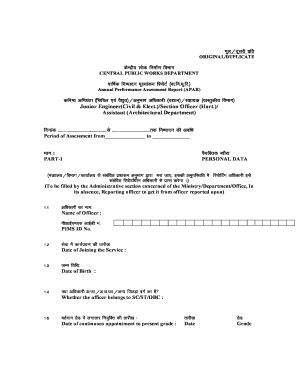
The Annual Performance Assessment Report (APAR) Template is a government form used by technical officers in India to evaluate their performance.
pdfFiller scores top ratings on review platforms




Find forms by description only. Has forms that my more expensive service does not offer.
Amazing customer support
Amazing customer support. We had account and payment issues; and contacted via online help. We received prompt and frequent communication that helped us solve the issue within a few interactions (all over the weekend too!).
Who needs APAR Form?
Explore how professionals across industries use pdfFiller.

APAR Form is needed by:
-
Executive Engineers preparing for performance reviews
-
Architects submitting professional evaluations
-
Government officials assessing staff performance
-
Department heads collecting performance data
-
HR personnel managing performance reports
Comprehensive Guide to APAR Form
Understanding the Annual Performance Assessment Report (APAR) Template
The Annual Performance Assessment Report (APAR) template serves as a vital instrument for performance evaluation within the Indian government sector. This template is designed to assess the performance of officers, ensuring accountability and fostering professional development. By utilizing the APAR form, officers can effectively document their achievements and areas for improvement.
The APAR template's structured format aids users in evaluating their roles systematically, aligning personal performance with organizational standards. This creates a comprehensive record that supports both accountability and growth in public service careers.
Benefits of Using the Annual Performance Assessment Report (APAR) Template
The adoption of the APAR template brings numerous benefits for officers as well as administrative departments. Here are some significant advantages:
-
Streamlines the performance evaluation process, ensuring timely assessments.
-
Aids in identifying strengths and weaknesses for continuous professional improvement.
-
Creates an official record of performance for future reference and evaluations.
By employing the APAR form, both officers and administrators can benefit from a clearly defined evaluation framework.
Key Features of the Annual Performance Assessment Report (APAR) Template
The APAR template is equipped with several features that enhance the user experience. Key attributes include:
-
Sections for personal data and professional qualifications, ensuring comprehensive profiles.
-
A self-appraisal component that allows officers to reflect on their targets and achievements.
-
A signature requirement to authenticate the documented performance assessment.
These sections help to provide clarity and structure to the evaluation process, ensuring all necessary information is captured.
Who Should Use the Annual Performance Assessment Report (APAR) Template?
The APAR template is designed for a specific audience within the government framework. Individuals required to complete this form include:
-
Executive engineers and architects, who directly report their performance.
-
Administrative staff responsible for processing evaluations and documentation.
-
Other stakeholders involved in assessing performance metrics.
Understanding the target audience ensures that the right individuals utilize the APAR template effectively.
When and How to Submit the Annual Performance Assessment Report (APAR) Template
Timely submission of the APAR form is critical for maintaining organizational standards. Here are essential guidelines regarding submission:
-
Identify and adhere to deadlines for submission to avoid potential consequences.
-
Utilize designated submission methods, whether physical or digital, based on departmental preferences.
-
Refer to administrative contacts for further clarification on submission procedures.
Understanding when to file the APAR template and the correct protocols can prevent delays in evaluation processes.
Step-by-Step Guide to Filling Out the Annual Performance Assessment Report (APAR) Template Online
Completing the APAR template online using pdfFiller is straightforward. Below is a guide to assist users:
-
Begin by entering personal information, including name and service details.
-
Provide self-appraisal details, highlighting key achievements and areas for improvement.
-
Review all entries for accuracy to avoid common errors.
-
Ensure all required fields are completed for a successful submission.
By following these steps, users can effectively navigate the filling process with confidence.
Security and Privacy Considerations When Using the APAR Template
When handling sensitive data within the APAR template, security is paramount. PdfFiller employs several measures to protect user information:
-
256-bit encryption for all document processing, ensuring data safety.
-
Compliance with security standards such as SOC 2 Type II, HIPAA, and GDPR.
By prioritizing security, users can confidently complete their APAR forms while safeguarding personal information.
Examples and Templates to Reference for the Annual Performance Assessment Report (APAR)
Providing users with relevant examples can significantly enhance the completion of their APAR forms. Consider the following:
-
A sample completed APAR template for better understanding of formatting and content.
-
Tips tailored to common fields to avoid mistakes in fillable sections.
Learning from examples plays a crucial role in ensuring users can navigate their submissions effectively.
Leveraging pdfFiller for Easy Submission of the Annual Performance Assessment Report (APAR) Template
Utilizing pdfFiller's robust features can facilitate a seamless form completion and submission process. Key features include:
-
E-signing capabilities to ensure swift and secure approvals.
-
PDF editing tools that allow customization of the APAR template.
-
Secure sharing options for managing submissions without hassle.
By leveraging these features, users can manage their APAR forms conveniently and securely.
What Happens After You Submit the Annual Performance Assessment Report (APAR) Template?
After submitting the APAR template, it's essential to understand the subsequent steps. Consider the following:
-
Potential outcomes, including evaluation procedures that follow submission.
-
Methods for addressing corrections or amendments if necessary.
-
Available pathways for checking application status for peace of mind.
By being informed, users can navigate the post-submission phase confidently.
How to fill out the APAR Form
-
1.To access the form on pdfFiller, visit the pdfFiller website and use the search bar to locate the Annual Performance Assessment Report (APAR) Template.
-
2.Once found, click on the form to open it in the pdfFiller interface, allowing you to fill out the necessary fields.
-
3.Before you begin, gather all required information including your name, date of joining, date of birth, performance targets, achievements, and any comments regarding shortfalls.
-
4.Navigating through the form, click on each fillable field to enter your details methodically, ensuring accuracy and completeness.
-
5.Make use of the fillable checkboxes where applicable, ensuring you provide comprehensive information in the designated sections.
-
6.Review your completed entries thoroughly before finalizing to ensure no errors are present in your responses.
-
7.Once satisfied with your completed form, save your work. Use the 'Save' option to store your document electronically.
-
8.To download a copy of your filled-out APAR, click on the 'Download' button, which will provide you with a PDF version for your records.
-
9.If submission is required, follow the provided instructions on the site or within the form for submitting your completed APAR through the relevant administrative channels.

Who is eligible to fill out the APAR template?
The APAR template is primarily for technical officers in government roles, such as executive engineers and architects, who need to self-assess their performance.
Is there a deadline for submitting the APAR?
Deadlines for APAR submissions typically depend on individual department policies, so it's vital to consult your administrative office for specific timelines.
What is the submission method for the APAR?
Completed APARs should be submitted according to the guidelines set by your respective Ministry or Department, often via internal systems or physical submission to administrative offices.
What supporting documents are required for the APAR?
Generally, you may need to attach documentation that verifies your achievements, qualifications, and any relevant performance metrics for a complete assessment.
What are common mistakes to avoid while completing the APAR?
Ensure that all fields are filled accurately and completely. Common errors include leaving sections blank, incorrect dates, and failing to provide required signatures.
How long does it take to process the APAR once submitted?
Processing times for the APAR can vary by department, but typically expect a few weeks for review and feedback after submission.
Do I need my APAR notarized?
No, the APAR template does not require notarization; however, it does require signatures from the officer being evaluated.
Related Content
Related Forms




Related Catalogs
Get the latest insights from our blog


If you believe that this page should be taken down, please follow our DMCA take down process
here
.
This form may include fields for payment information. Data entered in these fields is not covered by PCI DSS compliance.